
If you are still waiting two or three weeks for reliable monthly numbers, you are making important decisions using old information.
You may be hiring based on last month’s cash position, delaying investment because your runway is unclear, or entering investor conversations with reports that require further explanation. A slow month-end close is not simply an accounting inconvenience. It can affect cash control, tax planning, pricing, hiring and investor confidence.
The good news is that a faster month-end close does not mean rushing through your accounts. It means creating a repeatable process, supported by Xero accounting and sensible finance automation, so your figures become accurate, useful and available when you need them.
What is holding up your month-end close?
Many founders assume the close is slow because the business has become too complex. In reality, the delay often comes from fragmented processes.
Common causes include:
This creates a familiar cycle. Your bookkeeper requests documents, your team searches for invoices, the founder is asked to approve several items at once, and the final reports arrive after the decisions they were intended to support have already been made.
A reliable month-end close breaks that cycle.
What does a good month-end close look like?
A good close is a repeatable process that produces accurate and decision-ready numbers quickly. It is not simply a report produced for compliance.
For a growing UK startup or SME, the objective may be to produce reviewed monthly reporting within five to seven working days. More streamlined businesses may close sooner, particularly when bank feeds, document capture, recurring transactions and approval workflows are properly configured.
The key is consistency. Each month should follow broadly the same sequence:
This turns month-end from a last-minute exercise into a controlled operating rhythm.

A practical Xero month-end workflow
1. Prepare before the month ends
The fastest close begins before the final day of the month.
Maintain a shared close checklist with a named owner and deadline for each task. Set a document cut-off for employee expenses and supplier invoices, and ask department leads to submit outstanding information before the period closes.
You should also confirm that:
A lean chart of accounts matters. If every month involves reclassifying costs across numerous overlapping categories, your reports will take longer to produce and become harder to interpret.
2. Review bank feeds and transaction matching
With properly configured bank feeds, transactions should flow into Xero throughout the month. Xero can suggest matches and apply bank rules for familiar items such as software subscriptions, rent or regular payments.
However, automation is not a substitute for review. A suggested match may be incorrect, particularly where invoices have similar values or a payment covers several bills.
The practical objective is to move from manual data entry to exception review. You spend your time investigating items that need judgement rather than retyping transactions that your system already knows.
3. Check sales invoices and accounts receivable
Review invoices raised during the month and confirm that revenue is recorded in the correct period. Check for draft invoices, credit notes and overdue customer balances.
Your accounts receivable report should tell you:
This is essential for cash-flow decisions. A profitable business can still face pressure if invoices are raised late or customers pay slowly.
4. Check supplier bills and accounts payable
Review supplier invoices, bills awaiting approval and payments due shortly after month-end. Ask whether costs relating to the period have been captured, even if the invoice has not yet arrived.
This is where a clear cut-off procedure helps. For example, if a contractor completed work in March but submits an invoice in April, the cost may still belong in March’s management reporting. Depending on the amount and circumstances, an accrual may be appropriate.
5. Capture receipts, payroll and VAT information
Receipt capture tools can reduce missing evidence and improve the audit trail. Encourage your team to submit receipts when a purchase is made rather than waiting until the close.
Payroll should be reconciled to the accounts, including salary costs, PAYE, National Insurance and pension contributions. VAT data should also be reviewed as part of the wider process: not treated as a separate exercise.
For VAT-registered businesses, HMRC requires digital record keeping and filing through compatible systems under Making Tax Digital for VAT. You can review the relevant HMRC VAT guidance, whilst Xero’s month-end close guidance provides a useful overview of the accounting workflow.
6. Post accruals and prepayments where relevant
Accruals recognise costs incurred but not yet invoiced. Prepayments spread a cost across the periods that benefit from it.
For example, if you pay an annual software subscription in advance, recording the entire cost in one month may distort your monthly profit and loss account. A prepayment schedule can allocate the cost more fairly across the year.
These adjustments do not need to be complex, but they do need to be documented. Record what the adjustment relates to, how it was calculated and when it should be reviewed.
7. Review unusual movements and produce reports
Once the records are complete and reconciled, compare the current month with:
Investigate unusual movements rather than accepting them automatically. A sharp increase in marketing costs may be planned campaign spend: or it may be a duplicate bill. A fall in gross margin may reflect pricing pressure, a change in product mix or an incorrect coding decision.
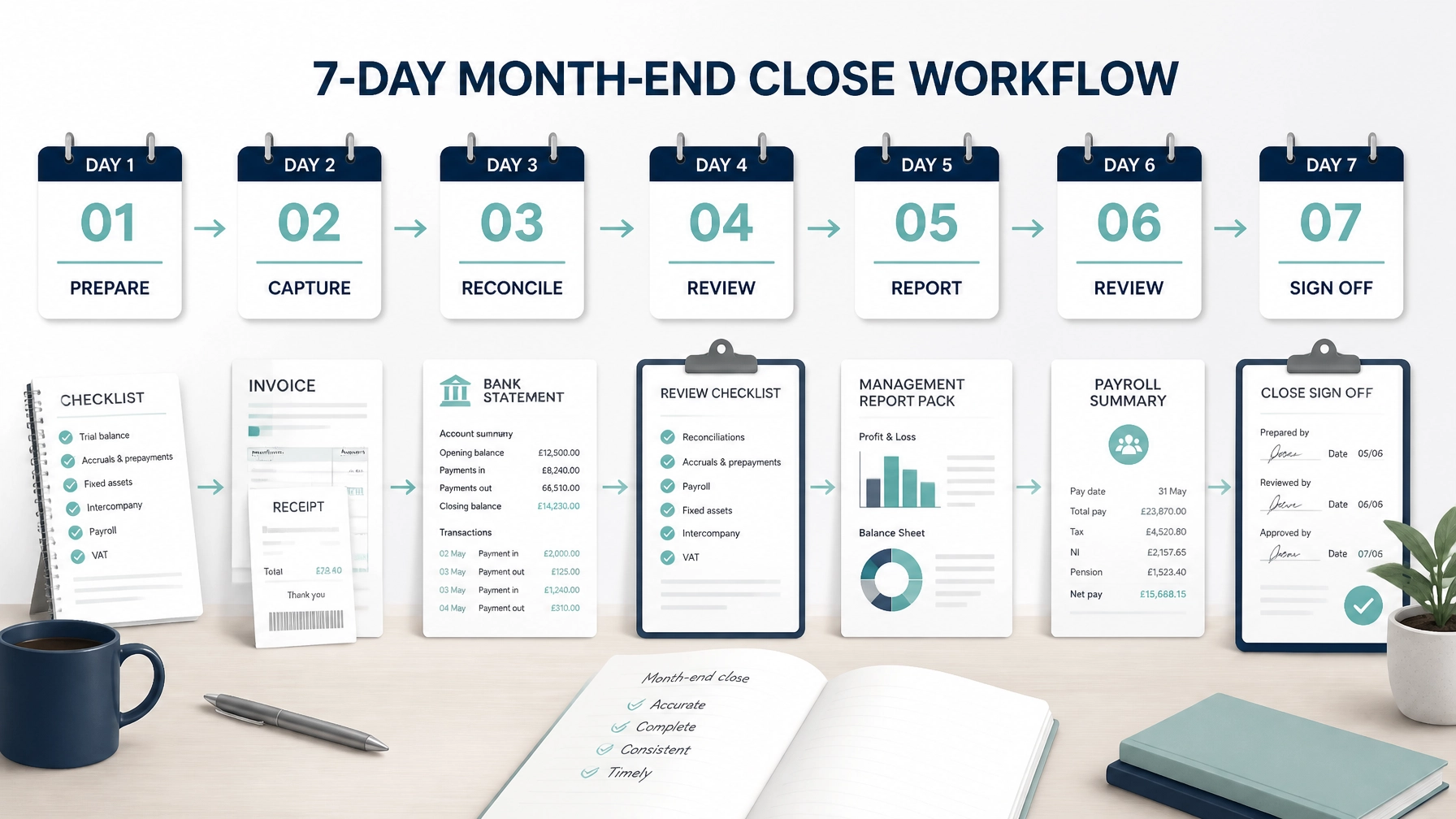
A seven-day month-end close timetable
DayOwnerActionBusiness outcomeDay 1Bookkeeper or finance leadConfirm cut-off, collect invoices and receipts, check bank feeds and payroll dataFewer missing documents and clear accountabilityDay 2BookkeeperReview sales invoices, supplier bills, accounts receivable and accounts payableBetter visibility of income, costs and upcoming cash movementsDay 3BookkeeperReconcile bank and credit card accounts; investigate unmatched itemsReliable cash and balance informationDay 4Finance lead or accountantPost accruals, prepayments, depreciation and other relevant adjustmentsMore accurate monthly profit and lossDay 5Finance leadReconcile payroll and VAT data; review the trial balanceReduced compliance and reporting riskDay 6Founder, director or adviserReview management reports and unusual variancesClearer decisions on spending, pricing and hiringDay 7Finance leadSign off reports, document actions and lock the period where appropriateA repeatable close and a dependable reporting record
The timetable can be compressed once the underlying process is working. But speed should follow control: not replace it.
What can Xero automate, and what still needs review?
AreaWhat can be automatedControl or review still requiredBank feedsImport transactions continuouslyConfirm feeds are complete and investigate exceptionsBank rulesApply coding to familiar transactionsReview rules regularly and check unusual itemsInvoice and bill remindersPrompt customers and suppliers through configured workflowsMonitor disputed, overdue or high-value balancesRecurring invoices and billsCreate regular transactions automaticallyConfirm amounts, dates and contracts remain correctReceipt captureAttach digital evidence to transactionsCheck the receipt supports the coding and VAT treatmentRecurring journalsPost consistent monthly adjustmentsReview assumptions and update values when circumstances changeReportingProduce scheduled profit and loss, balance sheet and cash reportsInterpret movements and approve the final reporting packVAT preparationSummarise relevant VAT records and support digital filingCheck treatment, reconciliations and submission readiness
Automation removes repetitive work. Human review protects the quality of the result.

Which reports should founders review every month?
Your monthly reporting pack should be built around decisions. At a minimum, consider reviewing:
Management accounts should not merely describe what happened. They should help you decide what to do next.
Reliable monthly numbers support more confident decisions about hiring, pricing, product investment and marketing spend. They also make it easier to prepare for fundraising, answer investor questions and complete due diligence without reconstructing several months of financial history.
For businesses claiming R&D tax relief, consistent records can also make it easier to identify relevant costs and maintain supporting evidence. The accounting records do not replace the technical assessment required for a claim, but they provide an important financial foundation.
Common mistakes that slow down the close
Chasing speed at the expense of accuracy
A report produced quickly but based on unreconciled or incomplete data is not useful. Define what “complete” means and retain a review stage.
Changing the chart of accounts every month
Frequent structural changes make trend analysis difficult. Keep your chart of accounts stable and use suitable tracking categories or reporting dimensions where needed.
Failing to reconcile
A bank balance in Xero is not reliable simply because it looks plausible. Reconciliation is the control that connects your accounting records to the underlying bank statement.
Confusing profit with cash
Profit includes accounting adjustments and may include unpaid invoices. Cash is affected by collections, supplier payments, VAT, payroll, tax and financing. Review both.
Ignoring cut-off
Recording revenue or costs in the wrong month can distort margins and lead to poor decisions. Agree clear cut-off rules and apply them consistently.
Leaving every review decision to the founder
The founder should understand the numbers, but should not become the only person who can approve every transaction or explain every report. Clear roles make the process more resilient.
Using Xero without an operating process
Xero is powerful cloud accounting software, but it cannot compensate for unclear ownership, missing documents or inconsistent coding. The system and the process must work together.
Your practical “start this month” checklist
Begin with a manageable improvement plan:
If your current Xero setup has developed piecemeal, this process may reveal that the issue is not the software itself. It may be the configuration, the workflow or the information your reports are designed to provide.
How Price & Accountants can help
At Price & Accountants, we help UK tech startups and growing businesses establish cloud accounting processes that provide timely, practical financial visibility.
Our work can include configuring Xero, reviewing your bookkeeping workflow, improving bank reconciliation and document capture, setting up reporting structures, and connecting monthly numbers to wider advisory, tax and funding decisions. You can explore our bookkeeping and accounting services, company accounting services and advisory and tax planning support.
Our Xero Optimisation Review is a consultative review of how your system and processes currently operate. We look at where month-end slows down, which tasks can be automated, what controls are missing and whether your reports answer the questions you need to ask as a director.
If your month-end is slow, manual or difficult to trust, we invite you to contact Price & Accountants to discuss your reporting process and whether a Xero Optimisation Review would be useful.
A faster close is not just about finishing accounting work sooner. It is about giving you reliable information early enough to make better decisions.
Frequently asked questions
How long should a month-end close take?
Many UK small and medium-sized businesses aim for five to ten working days. A well-designed process using Xero, continuous reconciliation and appropriate finance automation may reduce this to fewer days, depending on transaction volumes and complexity.
Can Xero produce management accounts?
Xero can produce core reports such as the profit and loss, balance sheet, cash summaries and aged receivables or payables. Your accountant or finance lead may then add adjustments, analysis, KPIs and commentary to create management accounts that support decision-making.
What is the fastest way to improve a Xero month-end close?
Start by reconciling bank accounts continuously, setting a clear document cut-off and assigning ownership for each task. Then review recurring transactions, bank rules, receipt capture and scheduled reports.
Does automation remove the need for an accountant?
No. Automation reduces repetitive processing, but professional review remains important for unusual transactions, accruals, prepayments, VAT treatment, tax planning, reporting interpretation and internal controls.
How does a faster close help with fundraising?
Timely, consistent management reporting makes it easier to explain revenue, margins, cash runway, operating costs and forecasts. It can also reduce the disruption of investor due diligence because your financial records are more organised and traceable.
Is a month-end close only necessary for larger businesses?
No. Even a one-person company benefits from knowing its cash position, profitability, tax liabilities and outstanding invoices. A simple close process can be introduced early and expanded as the business grows.